Megan Anderson • UX, Branding & Web Design
Megan Anderson • UX, Branding & Web Design

2025
UNI COURSE REGISTRATION SYSTEM
UI/UX
Product Design • Digital Customer Experience • Figma
Role: Creative generator responsible for UI execution and system cohesion
We redesigned UNI’s course registration experience from the ground up, focusing on clarity, efficiency, and student peace of mind. The result was a cohesive, brand-aligned system that helps students plan, register, and make academic progress with confidence.
UNI COURSE REGISTRATION SYSTEM
UI/UX
Product Design • Digital Customer Experience • Figma
Role: Creative generator responsible for UI execution and system cohesion
We redesigned UNI’s course registration experience from the ground up, focusing on clarity, efficiency, and student peace of mind. The result was a cohesive, brand-aligned system that helps students plan, register, and make academic progress with confidence.
2025
Built for Students
A student-centered redesign of UNI's course registration experience
Built for Students
A student-centered redesign of UNI's course registration experience
THE OBJECTIVE:
Make course registration faster, clearer, and less stressful.
Students needed a registration system that worked with them - not against them. Our goal was to reduce friction, prevent errors, and create a more intuitive experience that supports academic success.
THE CHALLENGE:
Where students get stuck
The existing registration system felt outdated and overwhelming. Students reported frequent errors, page reloads, unclear requirements, and constant overwhelm - all during an already stressful process.
Our Approach:
Research & Modeling • Information Architecture • Wireframing & Testing • Finalized System
Our approach combined student interviews, usability insights, and iterative testing to transform a complex system into something intuitive and supportive.
THE OBJECTIVE:
Make course registration faster, clearer, and less stressful.
Students needed a registration system that worked with them - not against them. Our goal was to reduce friction, prevent errors, and create a more intuitive experience that supports academic success.
THE CHALLENGE:
Where students get stuck
The existing registration system felt outdated and overwhelming. Students reported frequent errors, page reloads, unclear requirements, and constant overwhelm - all during an already stressful process.
Our Approach:
-
Research & Modeling
-
Information Architecture
-
Wireframing & Testing
-
Finalized System
Our approach combined student interviews, usability insights, and iterative testing to transform a complex system into something intuitive and supportive.
Research & Modeling
Listening Before Designing
Our design decisions were inspired by real student experiences. Across 78 interviews conducted by the class, we gathered insights from students actively navigating UNI’s current system.


Research & Modeling
Listening Before Designing
Our design decisions were inspired by real student experiences. Across 78 interviews conducted by the class, we gathered insights from students actively navigating UNI’s current system.

User Persona Highlight
Kaitlyn - Sophomore, Business Analytics
Kaitlyn registers independently, relies on research, and wants to feel confident before committing to classes. She still values quick access to advisor support when needed.
User Persona Highlight
Kaitlyn - Sophomore, Business Analytics
Kaitlyn registers independently, relies on research, and wants to feel confident before committing to classes. She still values quick access to advisor support when needed.
Information Architecture
What Students Need to See - and When
We translated research insights into a clear information architecture that prioritized visibility, progress tracking, and ease of navigation.
Key System Requirements:
-
Visual schedule preview during registration
-
Plan-of-Study dashboard
-
Clear course details & prerequisites
-
Smart filtering (Core, Electives, UNIFI)
-
Integrated advisor scheduling
View Course Schedule During Registration
-
Simple, weekly calendar view to help students visualize their course schedule
-
Ability to add courses and instantly preview selected course from their schedule builder
-
View required courses alongside class schedule to make sure nothing is left out
Plan-of-Study Dashboard
-
Past, present, and future semesters laid out so students can visually see their plan of study and adjust as needed
-
Number of credits completed and number of credits left for their area(s) of study
-
Progress indicator on whether or not semester courses are completed, in-progress, already planned, or still planning
Smart Filtering
-
Easily distinguish between Core, Elective, and UNIFI courses
-
Recommended courses based on past course data from the user and other students
-
Courses that correspond with student's area of study instantly populate first to eliminate time searching for needed courses
Integrated Advisor Scheduling
-
Students can schedule a meeting with their advisor through integrated scheduling right from the registration system
-
Send an email or start a chat with advisor for simple questions and updates
-
View their advisor office hours and contact info
-
Get notified of upcoming meetings with their advisor
Information Architecture
What Students Need to See - and When
We translated research insights into a clear information architecture that prioritized visibility, progress tracking, and ease of navigation.
Key System Requirements:
-
Visual schedule preview during registration
-
Plan-of-Study dashboard
-
Clear course details & prerequisites
-
Smart filtering (Core, Electives, UNIFI)
-
Integrated advisor scheduling
View Course Schedule During Registration
-
Simple, weekly calendar view to help students visualize their course schedule
-
Ability to add courses and instantly preview selected course from their schedule builder
-
View required courses alongside class schedule to make sure nothing is left out
Plan-of-Study Dashboard
-
Past, present, and future semesters laid out so students can visually see their plan of study and adjust as needed
-
Number of credits completed and number of credits left for their area(s) of study
-
Progress indicator on whether or not semester courses are completed, in-progress, already planned, or still planning
Smart Filtering
-
Easily distinguish between Core, Elective, and UNIFI courses
-
Recommended courses based on past course data from the user and other students
-
Courses that correspond with student's area of study instantly populate first to eliminate time searching for needed courses
Integrated Advisor Scheduling
-
Students can schedule a meeting with their advisor through integrated scheduling right from the registration system
-
Send an email or start a chat with advisor for simple questions and updates
-
View their advisor office hours and contact info
-
Get notified of upcoming meetings with their advisor

The old UNI registration system - class enrollment caused academic confusion and navigation difficulties made it hard to find and add classes to course schedule.

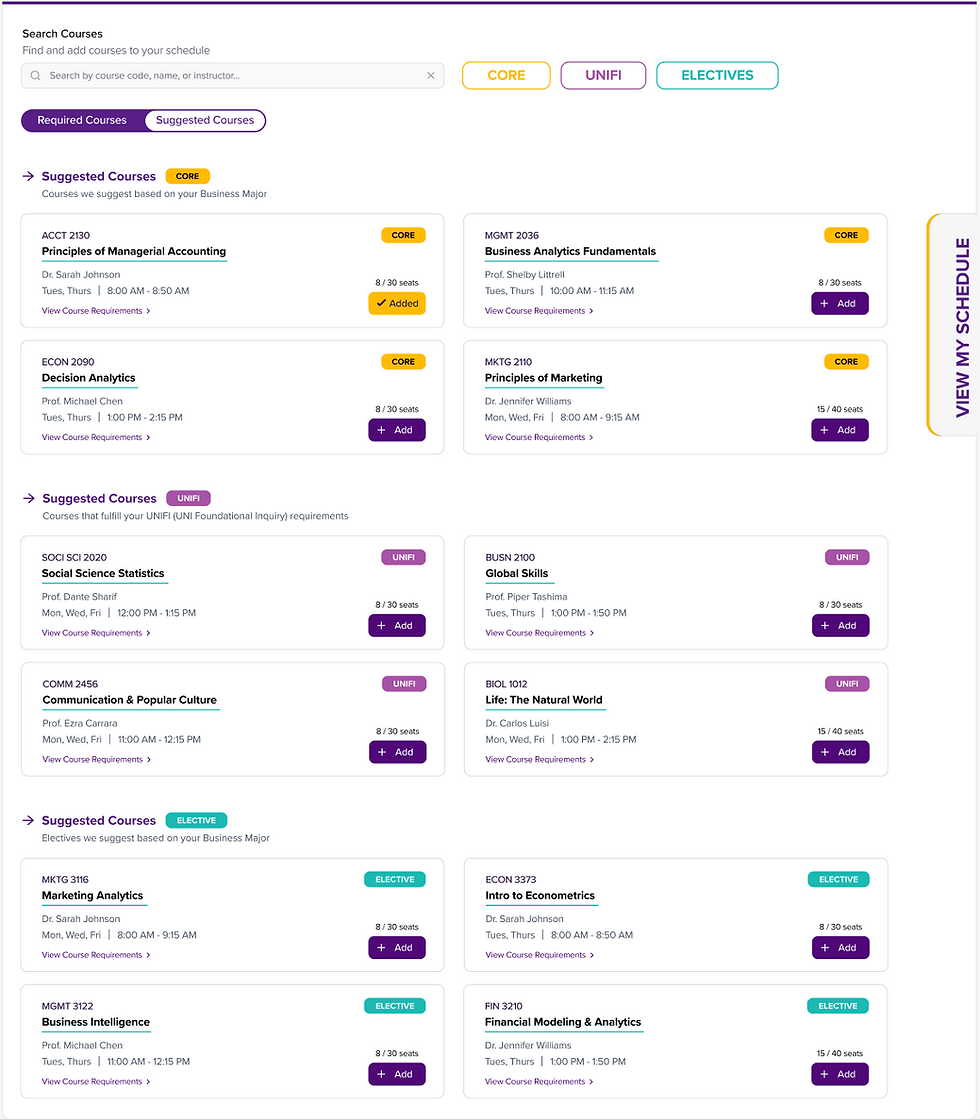
The new UNI registration system features an easy-to-navigate course enrollment system, with a pop-out schedule builder to easily view added courses as students view courses that can be added.
Wireframing & Testing
Refining Through Feedback
Through multiple rounds of peer and group testing, we refined hierarchy, reduced information overload, and simplified navigation to support faster decision-making.
Problems Addressed:
-
Information overload
-
Academic confusion
-
Difficult navigation
The New System
A System Built for Students
The final system balances functionality with approachability, aligning with UNI’s brand while modernizing the experience for today’s students.

The new UNI registration system features an easy-to-navigate course enrollment system, with a pop-out schedule builder to easily view added courses as students view courses that can be added.
The New System
A System Built for Students
The final system balances functionality with approachability, aligning with UNI’s brand while modernizing the experience for today’s students.
Wireframing & Testing
Refining Through Feedback
Through multiple rounds of peer and group testing, we refined hierarchy, reduced information overload, and simplified navigation to support faster decision-making.
Problems Addressed:
-
Information overload
-
Academic confusion
-
Difficult navigation
The old UNI registration system - class enrollment caused academic confusion and navigation difficulties made it hard to find and add classes to course schedule.